What it is
What a blog content calendar is for
A blog content calendar is the plan that sits between “we should blog more” and an article appearing on your website. It lists what will be published, on which day, about which keyword, and what state each piece is in. Without it, writing happens in bursts when someone finds an afternoon, and the site goes quiet for months at a time.
In PromoMax the calendar is not a separate planning document you maintain by hand. Topics arrive from the keyword research, each one is placed on a day, and the articles are written and published to your own website on schedule. The calendar is the plan and the plan runs itself.
That distinction matters for a business owner. A calendar in a spreadsheet is a promise you have to keep. A calendar wired to a publishing system is a promise that keeps itself, and you only step in when you want to change something.
A useful calendar also mixes the kinds of articles. Service topics answer “who do I call for this”, question topics answer “what does this cost or how long does it last”, and seasonal topics land when people start searching for them. A calendar made of only one kind runs out of steam, and a mixed one keeps producing pages that match different stages of a customer’s decision.
Inside the tool
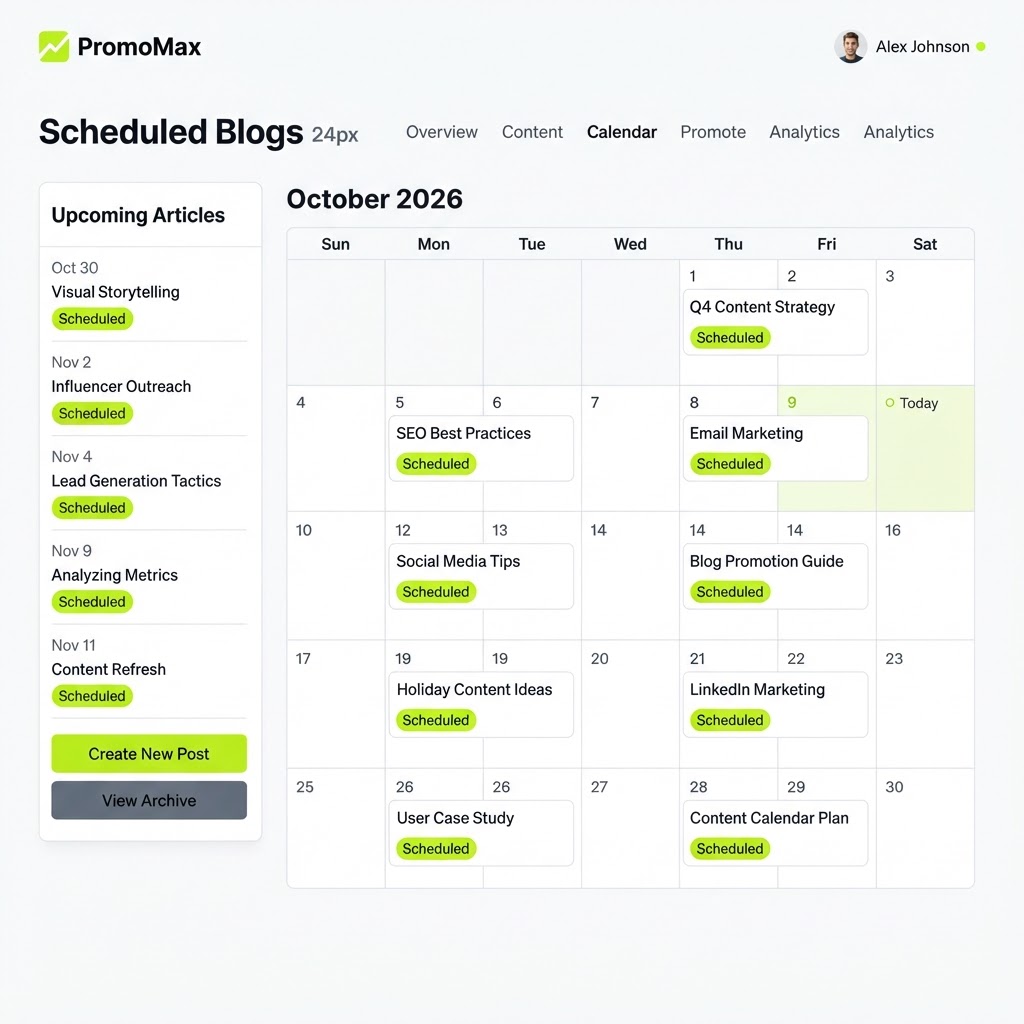
A real screen from the Blog Content Calendar & Scheduler
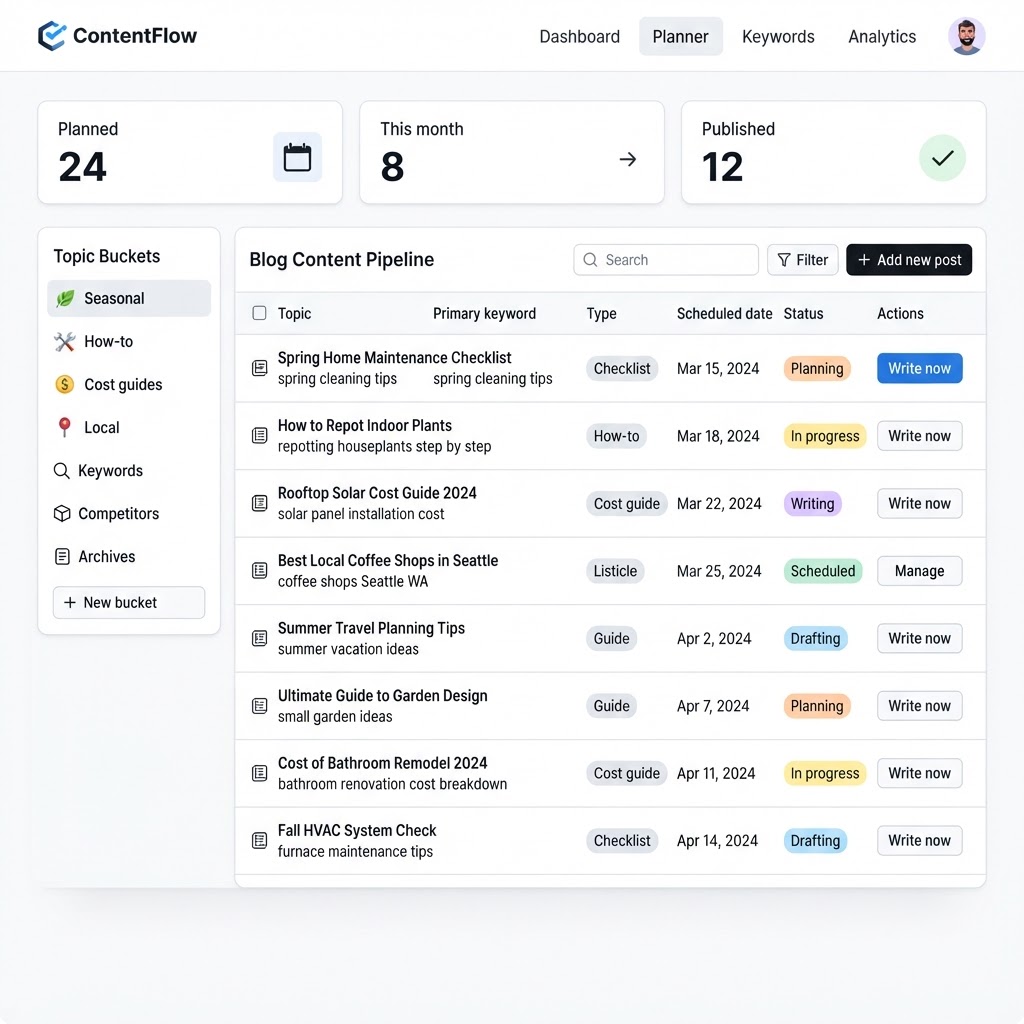
The problem
The problem: blogging dies in the second week
Most local business owners start a blog with good intentions and three articles. Then a busy month arrives, the fourth article never gets written, and the blog sits there with three posts from two years ago. Visitors notice. Search engines notice more, because a site with no new content gives them nothing new to rank.
The failure is not about writing skill. It is about planning and follow-through. Nobody decided which topics mattered, nobody put them on dates, and nobody wrote them, so publishing depended on finding a free afternoon and remembering the plan. That is three chances to fail every single week.
An abandoned blog also does quiet damage to trust. A customer who clicks through to articles that stop two years ago sees a business that starts things and stops, which is not the impression you want before you are invited into their home. Search engines see the same thing from the other side: a site with nothing new gives them no reason to come back and look.
Agencies solve this with an editorial calendar and a writer, which works and costs accordingly. What is missing for everyone else is a plan that already exists, articles that are already written, and dates that no longer depend on remembering.
How it works
How the blog content calendar works
- 1
Your content plan drops topics onto the calendar
The topics come from the keyword research side of PromoMax, already attached to target keywords and to your services and service areas. Each one is placed on a day, so you open the calendar and see a month of planned articles rather than an empty grid.
You can see the whole month at once, which is the point of a calendar: the plan is visible before any work happens, so you can change it while changing it is still cheap.
- 2
Every scheduled post shows its topic, keyword and status
Each entry carries the article topic, the keyword it targets and where it stands: planned, scheduled, published. You can tell at a glance what is live and what is coming without opening a single article.
That visibility is what makes the calendar useful as a management tool rather than decoration. You are not guessing whether the site is being updated.
- 3
Articles are written and published on their scheduled day
On the day an article is due, PromoMax writes it and publishes it to your website through the connection you set up. No reminder, no export, no pasting into an editor.
The calendar and the publishing are the same system, which is why the schedule holds even in your busiest week.
- 4
Move anything with a drag or a click
If a topic is no longer right, or you want an article to land next week instead of this one, change it on the calendar. The schedule follows your decision, and the article publishes on the new date.
You stay in control of the plan while the routine work of writing and publishing stays off your plate.
What's inside
What you get with the calendar
A visual calendar of every planned article
the whole month visible at once, so the plan exists as a plan and not as an intention.
Topics and target keywords per post
each entry shows what the article is about and which keyword it is written for.
Automatic writing and publishing on schedule
the article appears on your website on its day, without you logging in to write or upload anything.
One place to see what is live and what is next
published, scheduled and planned articles in a single view, so nothing is a surprise.
Ready when you are
Blog Content Calendar & Scheduler is already built — it just needs your business connected.
One login runs this tool plus every other tool in the PromoMax system.
Who it is for
Who it is for
It is for plumbers, HVAC companies, roofers, electricians, landscapers, cleaners, salons, dentists, restaurants, contractors, real estate agents, and any local service or product business that has a website and keeps meaning to publish something on it.
It fits owners who want to see the plan before it happens, and it fits businesses where three people would otherwise be emailing each other about who is writing the next post. One calendar, one schedule, no coordination required.
Dates also do something a topic list cannot: they space the work out. Three articles landing in one week and nothing for two months looks like a burst, while a steady cadence looks like a business that is open and busy. The calendar enforces the cadence, which is the part every do-it-yourself blog gets wrong.
If you want to see each article before it publishes, review mode keeps every entry waiting for your approval, and the calendar shows what is pending. You can also switch topics entirely when something changes in your business, such as a new service line or a town you just started covering.
Part of the system
Part of a complete marketing system
The calendar is one part of PromoMax, the complete marketing system on autopilot: it ranks your Google Business Profile on Google Maps and Google, publishes job content and articles to your website, keeps reviews flowing, and builds the signals that get your business mentioned by AI assistants like ChatGPT, Claude, Gemini and Perplexity.
The articles you see on the calendar are another part of that system at work, which is why the calendar can promise a date instead of a to-do.
The calendar is also the one screen worth checking weekly. A minute on Monday tells you what is publishing, what needs a topic change and what has already gone live, which is the entire editorial meeting a small business needs.
The calendar also makes the plan reviewable by somebody other than you. If a partner or a manager wants to know what marketing is actually happening, you show them the month instead of explaining it, and that single view ends most of the arguments about whether the blog is being handled.
Keep the calendar honest and it stays useful. Remove a topic that no longer matches your services, keep the cadence realistic for your plan, and let the schedule do the work. A calendar that reflects reality is a management tool; one that reflects ambition is decoration.
FAQ
Frequently asked questions
What is a blog content calendar?
It is a dated plan of the articles your website will publish: which topic, which keyword, which day and what status. In PromoMax the blog content calendar is connected to publishing, so an entry on the calendar becomes a live article on its day instead of a note to write it later.
How far ahead can I plan?
The calendar shows the month ahead from your content plan, and you can see everything planned and scheduled beyond the current week in the same list. You can move an entry whenever your priorities change.
What happens on a scheduled day?
The article is written and published to your website through the connection you set up, and its status changes to published on the calendar. You do not need to open an editor or approve anything on the day unless you have review mode turned on.
Can I change or move a scheduled post?
Yes. Change the date or the topic on the calendar and the schedule follows. You can also pause a planned article that no longer fits your services or your area, so the calendar stays honest about what is coming.
How is this different from the AI blog writer?
The blog content calendar is the plan and the schedule: what will publish and when. The AI blog writer is the part that produces each article. They are two views of the same system, so the calendar can show you published articles that the writer created.