What it is
What Google review management means in practice
Google review management is three jobs done consistently: asking the right customers for a review at the right moment, seeing what came in, and answering it. Businesses that do all three end up with a steady wall of recent reviews. Businesses that do none of them end up with eleven reviews from four years ago and a competitor’s four hundred and twelve sitting above them on the map.
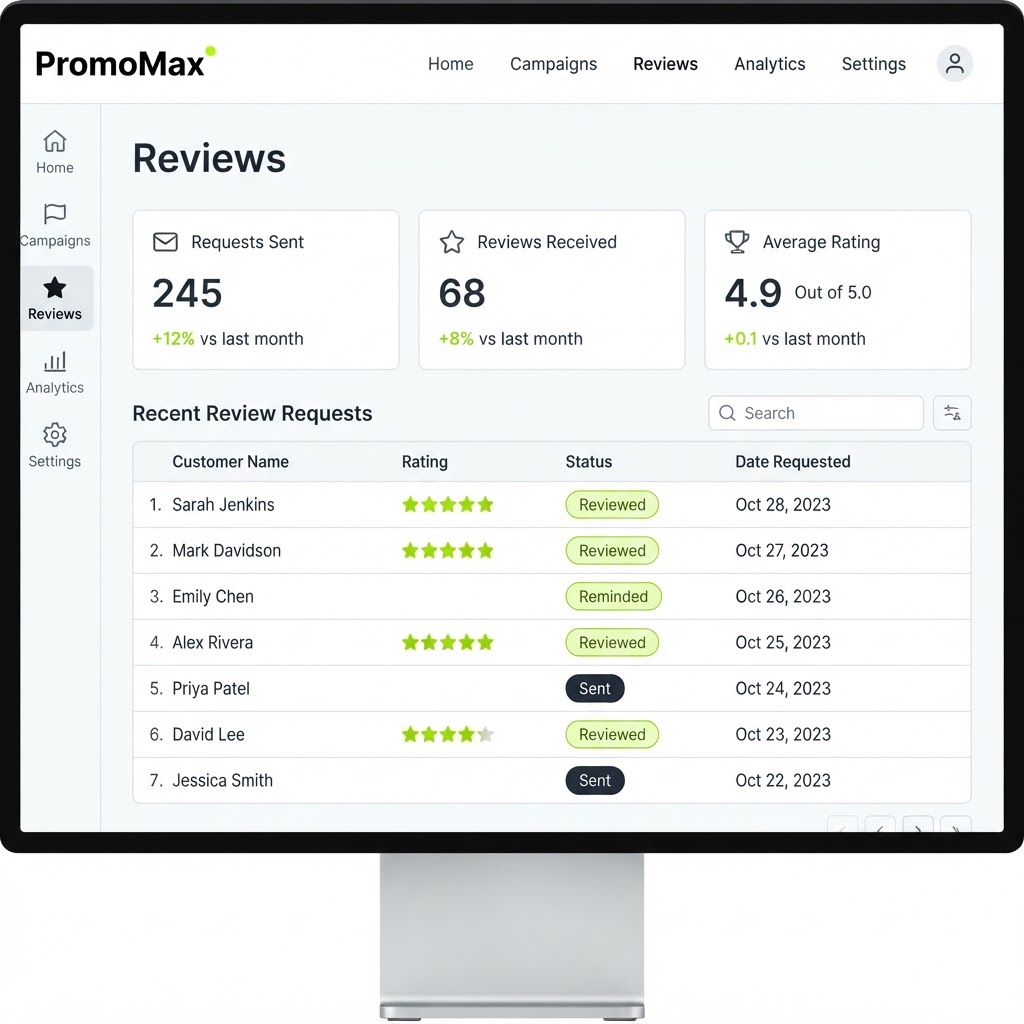
PromoMax makes each of those three jobs small. Every employee gets their own review-request link to text or show a customer when the job is done. Requests, submitted reviews and replies are tracked in one dashboard connected to your Google Business Profile, so you can see who asked, who got reviewed, and which reviews are still waiting for an answer.
It is deliberately focused on Google reviews rather than being a general reputation tool. Your Google listing is where local customers make the decision, so that is where the effort belongs.
Recency matters as much as the total. A customer reading your profile scrolls to the newest reviews first, and a list whose most recent entry is from last spring reads as a business that may not be busy or may not be around. Google shows your rating and your review count right in the map pack, next to businesses that collect reviews every week, and that comparison happens before anyone opens your website.
Inside the tool
A real screen from the Google Review Management Software
The problem
The problem: happy customers say nothing, and the phone stops ringing
A satisfied customer is not going to hunt down your Google listing and leave a review on their own. They are at the curb, saying thank you, and then they are gone. The only customers who reliably find their way to a review form are the furious ones, which is why so many profiles look worse than the business actually is.
Asking verbally does not fix it either. “If you get a chance, leave us a review” produces nothing, because the customer now has to remember your business name, open Google, find the right listing among the ads and the map pack, and figure out where the review button is. Every one of those steps loses people.
The same problem hits the other direction. Reviews arrive, nobody answers them, and it shows. A wall of unanswered reviews, including the critical ones, tells the next customer that no one is paying attention, and it wastes the one chance you get to answer a complaint in public.
Owners also lose track of the ask. Someone on the crew means well, asks verbally, and the customer says “sure, send me the link” — and there is no link to send. Weeks pass, the goodwill expires, and nobody can say which jobs turned into reviews and which did not. Google review management without a record of requests is guesswork dressed up as effort.
How it works
How the Google review management software works
- 1
Connect your Google Business Profile
You connect the profile you already own, and PromoMax reads your reviews and replies so everything appears in one place. Nothing about your listing changes, and you keep full ownership.
Once connected, the dashboard becomes the single screen where requests, reviews and replies live, instead of three apps and a browser tab you forget to open.
- 2
Every employee gets their own review-request link
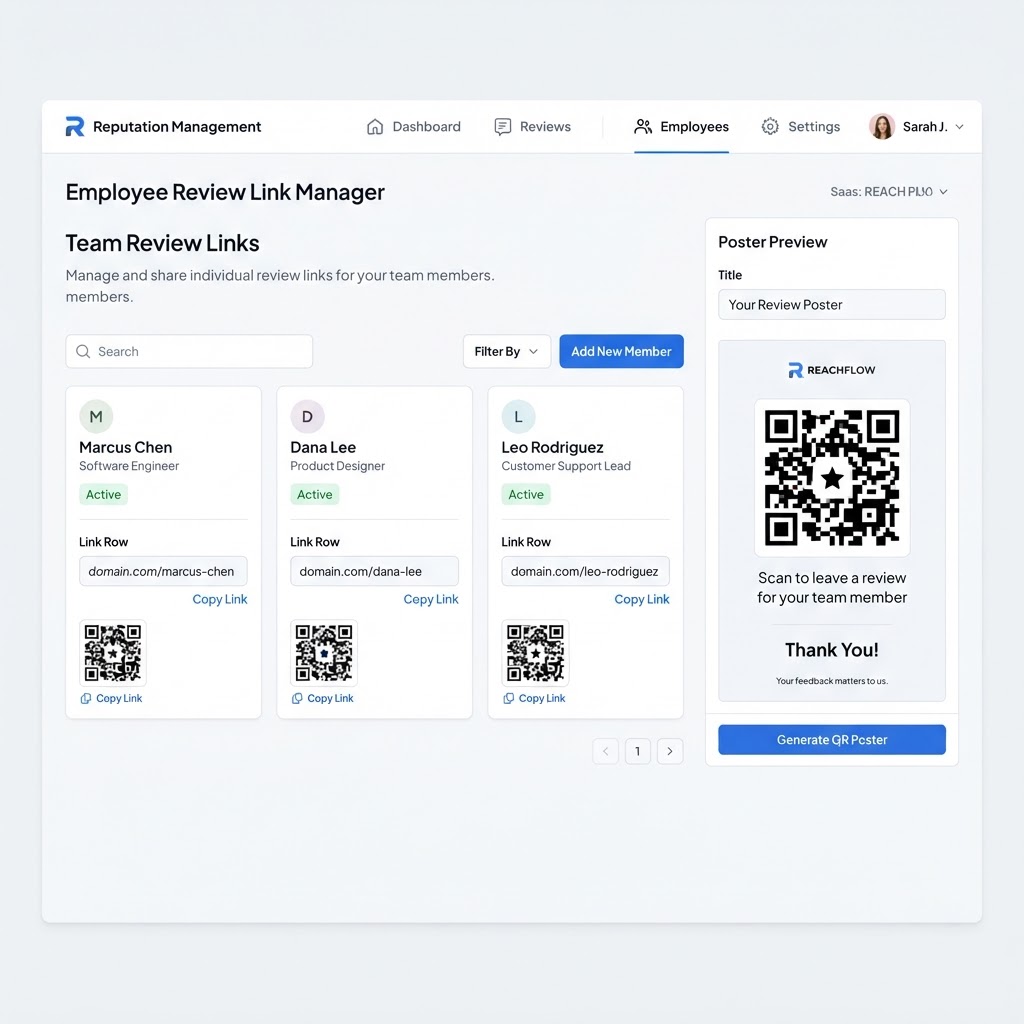
Each person on your team gets a personal link they can text to a customer, or show as a QR code, at the exact moment the job is finished and the customer is happy. The link opens the customer’s own Google review form for your business, so there is no searching and no confusion.
Because the links are individual, you can see which employees are asking and which jobs turned into reviews, instead of guessing why review flow slowed down.
- 3
Requests, reviews and replies are tracked in one place
Every request you send is logged, every review that arrives is collected, and every reply is recorded with it. You always know what is outstanding: who still needs a nudge, and which review has not been answered yet.
You can reply to reviews from the dashboard, including the difficult ones, so no review sits unanswered while a customer waits for a response.
- 4
Reviews arrive steadily instead of in bursts
Steady is the pattern Google rewards, and steady is what you get when asking is built into the end of every job rather than into a burst of enthusiasm twice a year. A few reviews a week beats twenty in one weekend followed by eight quiet months.
When job capture is running alongside it, each request goes out with fresh proof of work on your listing, so the review and the job story match.
What's inside
What you get with the tool
A personal review-request link per employee
each employee can ask in their own name, which is more personal for the customer and measurable for you.
Text and email requests in one tap
send the request while the customer is still standing there, before the moment passes.
Tracking for every request and review
a clear record of what was sent, what was opened, what turned into a review and what did not.
Reply management
answer reviews, including critical ones, from one screen so nothing sits unanswered for weeks.
Steady review growth tied to real jobs
requests built into the end of the work rather than a one-off campaign you have to remember to run.
Ready when you are
Google Review Management Software is already built — it just needs your business connected.
One login runs this tool plus every other tool in the PromoMax system.
Who it is for
Who it is for
It fits any local business whose reputation is built one customer at a time: plumbers, HVAC companies, roofers, electricians, landscapers, cleaners, salons, dentists, restaurants, contractors, real estate agents, and any local service or product business where a homeowner checks your reviews before they call.
It is built for teams as small as two and for crews where every technician deals with customers. If you have people in the field, employee-level links turn “we should ask for more reviews” into something that actually happens.
Owners running more than one location get the same benefit per profile, since requests are tied to the listing they belong to and each location asks at the end of its own jobs. And the replies you write do more than answer one customer: they are read by everyone comparing you against two other businesses in the same map pack, which is why a calm, specific reply is worth the two minutes it takes.
Part of the system
Part of a complete marketing system
Reviews work best when the rest of the marketing is running underneath them. PromoMax also ranks your Google Business Profile on Google Maps and Google, publishes job content and articles to your website, and builds the signals that get your business mentioned by AI assistants like ChatGPT, Claude, Gemini and Perplexity.
The review tool is one part of a complete marketing system, and it is the part that compounds: every job produces a review, and every review makes the next customer more likely to call.
Replying is where the tool earns its keep on the hard days. A critical review answered calmly, with the specific fix and an invitation to call, is read by everybody who comes after, and it often reads better than the complaint itself. Answering within a day is the goal, and the dashboard makes that realistic because the review and the rest of your customer contact sit in the same place.
One practical habit makes all of this easier: ask on the day of the job, and make sure the person who did the work is the one asking. Customers review people more readily than companies, and an employee link carries that name along with the request.
FAQ
Frequently asked questions
How do I get more Google reviews?
Ask more people, at the right moment, with a link that removes every step between the ask and the review. In PromoMax, each employee has their own request link to send the moment a job finishes, and every request is tracked so you know what is working. Google review management is mostly consistency, and consistency is what the tool automates.
Is it against Google’s rules to ask for reviews?
No. Asking your customers for a review is allowed. What is not allowed is offering discounts or gifts in exchange, or filtering customers so only happy ones get asked. PromoMax sends the request to every customer you choose to ask, with no incentives and no selection, which keeps you on the right side of Google’s policy.
Can I respond to reviews from PromoMax?
Yes. Your reviews appear in the dashboard and you can reply to them there, with the reply published to your Google profile. Having replies in the same place as the request tracking is what stops a critical review sitting unanswered for a month.
Do employee links show me who earned the review?
Yes. Because each employee has a personal link, the request is recorded against that person and that job. You can see who is asking regularly and which requests turn into reviews, which also makes it easy to recognize the people bringing in the most feedback.
How fast will I see results?
It depends on how many jobs you finish and how consistently your team asks. Some customers review the same day, others take a week. There is no fixed number of reviews per month that anyone can honestly promise: what the tool guarantees is that every customer who says yes has a one-tap path and that no request or review gets lost.