What it is
What job site photos and proof of work means
Job site photos are the pictures your crew takes at a finished job, and proof of work is what those pictures become when they are published with the service, the city and a short description attached. A photo alone is a nice memory. A photo with “water heater replacement in [your city], same-day install, 6 hours on site” is evidence: evidence for the customer deciding whether to call you, and evidence for Google that your business actually does this work in this area.
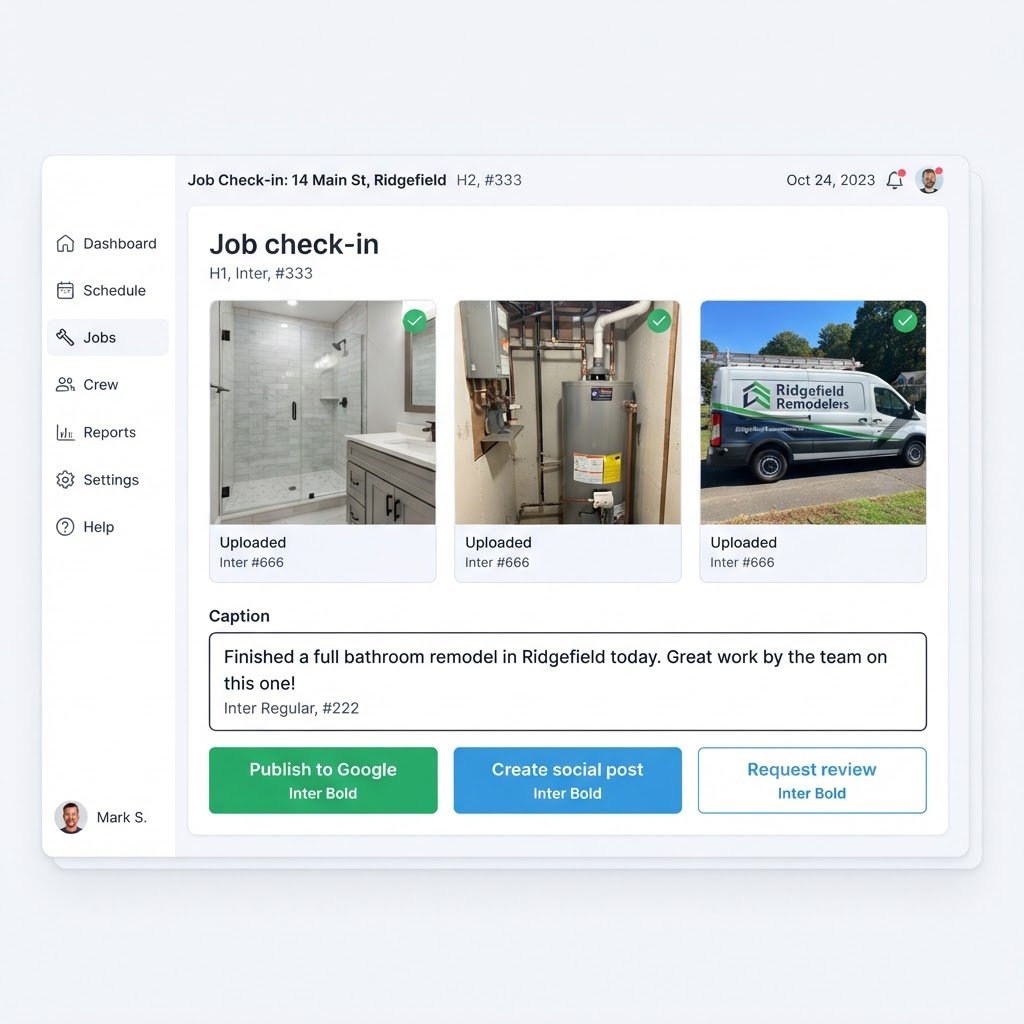
PromoMax turns that evidence into content automatically. Your technician photographs the finished job, picks the service and the city, and the platform writes and publishes a Google post, adds the job to a Recent Jobs page on your own website, and creates a social post from the same photo. One picture, three places, no marketing person involved.
It is also honest marketing, which matters more than it used to. These are pictures of work you actually finished, not stock photos of a generic crew, and they carry the service and the city because that is what your technician entered. When a customer reads a Google post about a bathroom remodel in their own town and recognizes the house down the street, the credibility is doing work that no caption can fake.
Then the part most businesses never connect: the customer who just received that work gets a friendly text asking for a review, after the job is live. The review lands on a profile that has fresh, matching proof of work behind it, which is exactly the combination Google rewards and customers trust.
Inside the tool
A real screen from the Job Site Photos & Proof of Work
The problem
The problem: your best work is invisible
A roofing crew finishes a beautiful tear-off and install. Someone snaps four photos on a phone. Those photos sit in a camera roll until the phone is replaced. Meanwhile the competitor across town, doing half the quality of work, has twenty recent photos on their Google listing and a website full of recent jobs, and they are the ones the homeowner calls.
The reason is not laziness. At four in the afternoon, with two more jobs to get to, nobody has time to download photos, resize them, write a caption, log into Google, log into the website, post to Facebook and remember to ask for a review. So it does not happen, and a year goes by with the last public sign of activity being a holiday post from last December.
Review requests have the same problem with worse timing. Asking a week later, from an office, when the customer has moved on, gets nothing. Asking at the moment the customer is standing in front of the finished work is when people say yes. Job site photos with an automatic review request built into the same flow solve both problems at once, because the ask happens while the crew is still on site.
There is a quieter cost too: your website never grows. A Recent Jobs page that fills with real, location-specific, service-labeled work is exactly the kind of page search engines use to understand what a business does and where, and it is the page customers browse before they call to see whether your standard of work matches theirs. Without a habit of capture it stays empty, and your site keeps proving nothing.
How it works
How job site photos become marketing
- 1
Your technician finishes the job and opens the link
Your tech scans the QR code on the truck, the clipboard or the invoice, or opens the link you send them. There is no app to install and no account for them to remember, so it works on whatever phone they carry.
The whole flow is built for someone standing outside with gloves on: big buttons, no forms to fill out, nothing to type beyond one line.
- 2
They snap the photo and type one line
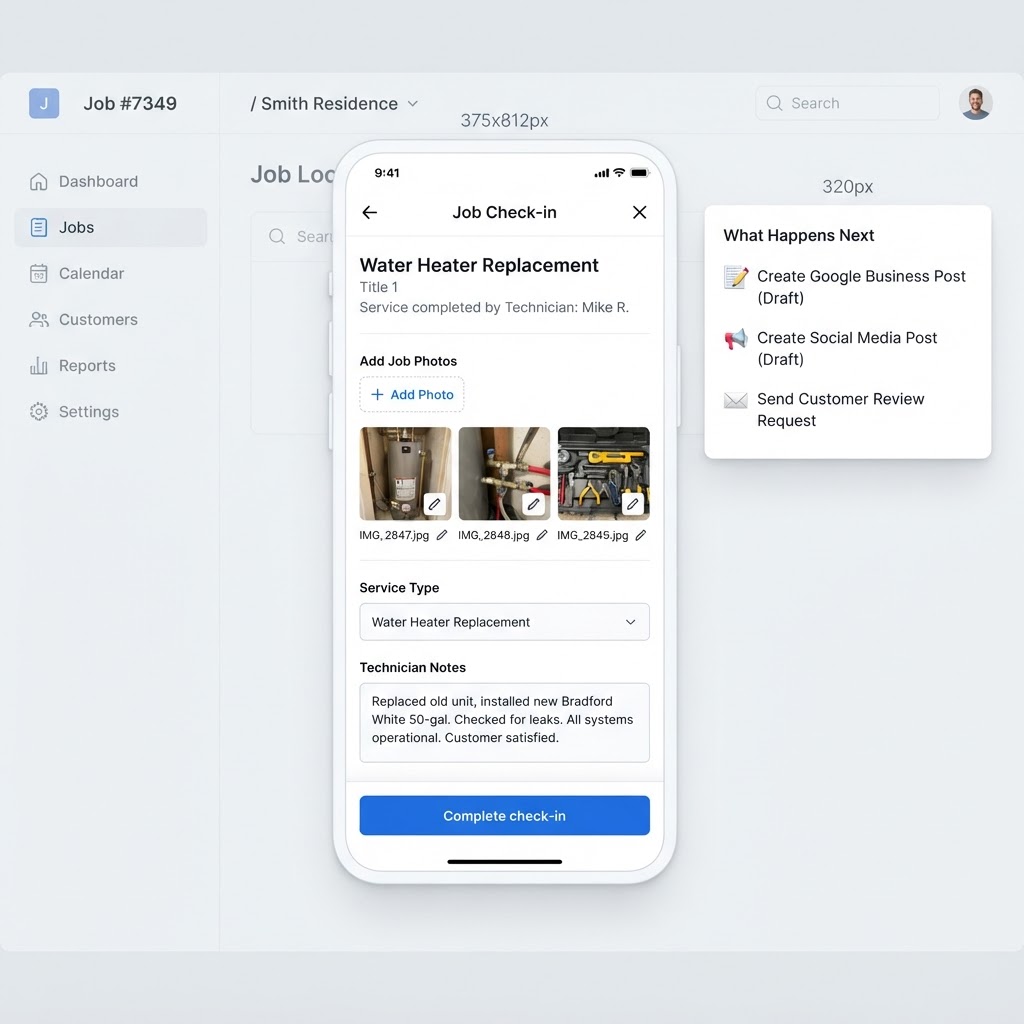
The technician takes the photo of the finished work, types one line about what was done, and selects the service from your list. The city comes from the job address, and the location is confirmed so the content is tied to a real place.
That is the entire input. Everything customers read is written from that photo, that line, the service and the city.
- 3
PromoMax publishes it in three places
The job becomes a Google post on your business profile with the photo and the details. It becomes an entry on the Recent Jobs page of your website, with the photo, the description and the map and service data that search engines read. And it becomes a social post for your pages.
Because these are real jobs happening now, your listing looks active and your website grows with location and service content every week, without a content calendar to manage.
- 4
The review request goes out once the work is live
After the job content is published, the customer receives a friendly text asking for a review of the work that was just done. The request is timed to the job they can still see in front of them, which is when people actually respond.
The review connects back to that real job, so your profile shows recent proof of work and recent reviews telling the same story.
What's inside
What you get with the tool
One-tap job capture from any phone
a QR code or link your crew opens in the browser, with no app to install and no account to create.
Automatic Google posts from real jobs
each finished job publishes to your business profile with the photo, the service and the city attached.
A Recent Jobs page on your website
a page that keeps growing with real completed work, which is exactly the fresh, local content search engines look for.
Social posts from the same photo
one picture becomes a post for your social pages, so your feeds show what you are actually doing this week.
Automatic review requests after the job
the customer is asked at the right moment, once the job content is live, not a week later from an office.
A dashboard of every job
photos, services, cities and dates in one place, so you can see the body of work you are building and use it in quotes and proposals.
Ready when you are
Job Site Photos & Proof of Work is already built — it just needs your business connected.
One login runs this tool plus every other tool in the PromoMax system.
Who it is for
Who it is for
Any business that finishes work at a customer address: plumbers, HVAC companies, roofers, electricians, landscapers, cleaners, contractors, garage door and pool companies, restoration crews, and any local service or product business where the finished result is worth photographing.
It works whether you are one person taking your own photos or a team of fifteen where every technician has the link. The job record is the same either way, and it is the owner who sees the collection growing.
It also matters most on high-ticket work. A homeowner spending five figures on a roof or a kitchen wants to see the last job you did that looked like theirs, and a Recent Jobs page built from real photos answers that question faster than a paragraph of assurances. The same collection becomes the portfolio you show on estimates, without anyone assembling a slide deck.
Part of the system
Part of a complete marketing system
Proof of work is one engine inside PromoMax. The same system ranks your Google Business Profile on Google Maps, writes and publishes articles to your website, keeps your review pipeline moving, and builds the footprint that gets your business mentioned by AI assistants like ChatGPT, Claude, Gemini and Perplexity.
Every job you photograph feeds all of it: the posts keep your listing active, the job pages grow your site, and the reviews keep coming in behind them.
It also gives you something concrete to show a new customer on an estimate: photographs of comparable work, in their town, finished this month.
FAQ
Frequently asked questions
What are job site photos used for?
For proof. They show customers and search engines exactly what you finished, where you finished it and how recently. In PromoMax the same job site photos become a Google post, an entry on your website Recent Jobs page, a social post and the trigger for a review request, so one photo does the work of four marketing tasks.
How does a job check-in work for my technicians?
Your tech opens the link or scans the QR code, takes the photo, types one line about the work and confirms the service. The city and location come from the job. That is the entire input, and it takes less than a minute at the truck.
Where does each job get posted?
Three places from the same photo: a Google post on your business profile, the Recent Jobs page of your own website with the photo, description and location data, and a social post for your pages. All three carry the service and the city.
When is the review request sent?
After the job content is live, which means right after your technician captures the job rather than days later. The request goes out while the customer is still standing in front of the finished work, which is when people are most willing to leave a review.
Does this help my Google ranking?
Fresh, real, location-specific content and a steady flow of reviews are the signals Google rewards for local businesses, and this tool produces both automatically. It does not and cannot promise a position, because Google decides placement, but it removes the “nothing new here” problem that holds listings back.